Know what you paid, and spot what changed.
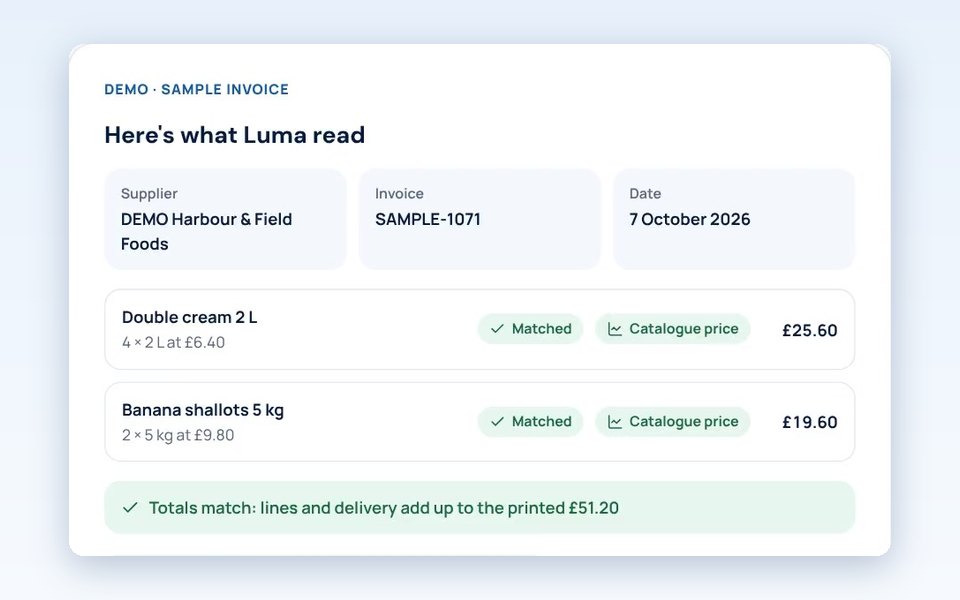
Upload supplier invoices as PDF, Excel or CSV. Luma reads the lines for you to check, then keeps track of each price so a rise doesn't slip past.
In TABLEVA now
The problem
Price rises hide in the small print.
Prices creep up mid-contract, pack sizes change and new charges appear. Catching it means checking each line against the last invoice, and few kitchens have time for that.
How TABLEVA helps
Read for you, checked by you
Luma reads spreadsheets and most PDFs and drafts the lines. You check them before anything is saved.
Every price remembered
Products & Prices keeps what you pay for each item from each supplier, so a change stands out the next time it's invoiced.
Where savings start
Your invoices become the baseline savings are measured against, and the starting point for comparing suppliers.
Illustrative example
Butter, 2 kg block
Same butter, same supplier. Luma spots the difference before you reorder.
- Last month's invoice4 blocks£14.20 a block
- This week's invoice4 blocks£15.35 a block
Price rise flagged+£1.15 a block
What's ready, and what's next.
We say plainly what you can use today. Anything still to come is marked, and nothing switches on without you.
- In TABLEVA now
PDF, Excel and CSV invoices from any supplier
- In TABLEVA now
Lines drafted by Luma and checked by you before they're saved
- In TABLEVA now
Prices tracked by product and supplier
- Coming soon
Your own address to forward supplier emails to
- Coming soon
Photos and scans read automatically. Until then, they're saved beside a form to type in
- Coming soon
Supplier bills brought in from Xero, QuickBooks, Sage or FreeAgent
Works with
- Invoice uploadIn TABLEVA now
- Forward invoices by emailComing soon
- Photo reading for invoicesComing soon
- XeroComing soon
- QuickBooksComing soon
- Sage AccountingComing soon
- FreeAgentComing soon


Product names and logos belong to their owners. Showing one doesn't mean that company partners with or endorses TABLEVA. Connections work only once they're switched on and you've allowed them.
See the integrations directorySee it with your own invoices.
Click around a sample restaurant first, with nothing to sign up for. Or start your free pilot and Luma begins with the invoices you already have.